Help That Floats: A Video on Every Page, Because Not Everyone Has Two Screens
There is a quiet assumption baked into how most software does help: that you have somewhere else to put it. The tutorial opens in a new tab, the knowledge base lives on its own site, the webinar plays in another window, and the software just assumes you have a second monitor to park it on while you follow along.
Here is the thing we had to admit while building Eventist: not everyone has two screens. Honestly, not everyone even has a *big* screen. A lot of our organizers run an entire competition or festival from one laptop, sometimes a small one, sometimes at a kitchen table, sometimes at the venue. For them, "help in another tab" means read a step, switch tabs, find where you were, forget the step, switch back. It sucks, and it sucks the most for the people who need help the most.
So we built help that floats.
A video on every page
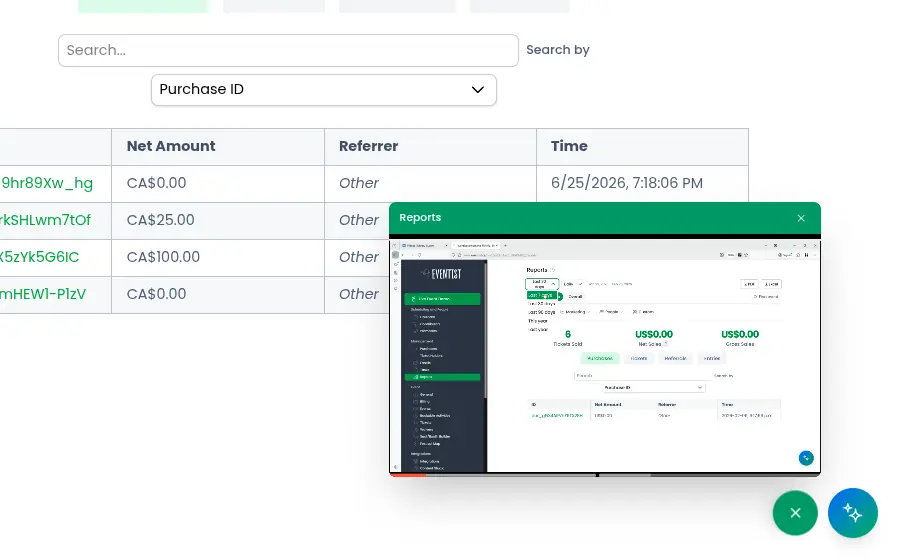
Every page in Eventist has a floating play button in the corner. Press it and you get a short video walkthrough of *that exact page*, not a generic product tour. Land on the schedule builder, get the schedule builder video. Open the discounts page, get the discounts video. Nobody wants to scrub through a 40-minute overview to find the two minutes about the page they are actually looking at, so we recorded the two minutes for every page instead.
Built for one screen
The video plays in a small floating window that sits *over* your dashboard, and the window is yours to arrange. Drag it anywhere by its header. Resize it from any corner, so you can shrink it into a little corner while you work or blow it up when you want to see exactly which button got clicked. And it keeps playing while you click around underneath it.
That last part is the entire point. The way people actually learn software is: watch a step, pause, try it yourself, un-pause. With a floating video, that loop happens on one screen without ever leaving the page. The video demonstrates the schedule builder while you are on the schedule builder, on real pixels you can reach.
The written guides float too
Videos are for showing you around. Written guides are for the specific setting you are staring at, and those float as well. Next to the tricky parts of Eventist, ticket capacity rules, discount scopes, booking schedules, there is a small help icon. Hover it and the relevant guide pops up in the same kind of panel: draggable, resizable, sitting right on top of the form it explains. You read the step with the actual fields directly underneath it, fill them in, and close the panel. No tab, no losing your place, no split-screen origami.
And if you love tabs, keep your tabs
Some people do have the second monitor, or just prefer a full-page read. Nothing floats against your will: every guide panel has an open-in-new-tab button in its header, and the full help library is always there as a regular site you can browse. The floating version is the default because it serves the person on one small screen, but it is a choice, not a cage.
The principle underneath
We have written before about how the software should carry the knowledge so you don't have to. This is the same idea applied to help itself: instructions are only useful if you can read them *while doing the thing*, and for most people, "while doing the thing" happens on a single screen. So the help comes to the page, floats above it, and gets out of the way when you are done.
If that sounds like the kind of software you want behind your next event, take a look around or book a call. The first video is waiting on whatever page you open.
Tags
Ready to simplify your events?
Join hundreds of organizers, studios, and festival directors who trust Eventist to run their events.